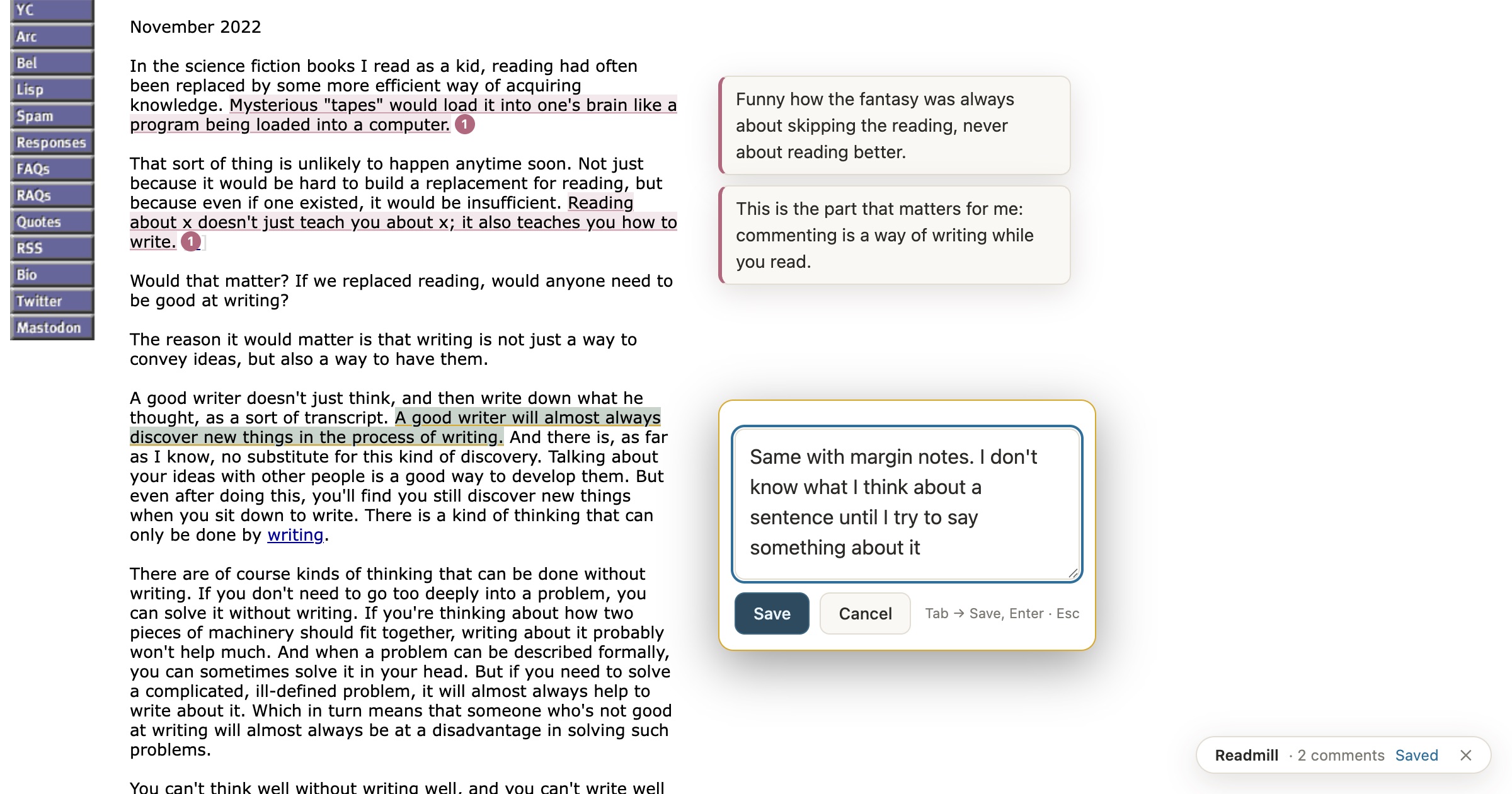
One pedal steps to the next sentence. Another opens a comment box, which you can dictate into. Each note stays pinned beside the sentence it’s about, and it’s still there the next time you open the page. It works on any article, essay or doc.
Your notes aren’t kept in an account or a cloud. Each page gets a .json file and a readable .md copy in ~/notes/web-comments/, so you can grep them, edit them, sync them, or hand them to an AI.
Three pedals: a, b, c
- a steps forward
- b dictates
- c comments and saves
The pedal is a three-key PCsensor FootSwitch. This one and this one are different listings of products that work identically. Out of the box its pedals just type the letters a, b and c, and a small rule in Karabiner-Elements turns taps and holds into the keys Readmill listens for.
What each press does
tap a
Next sentence.
hold c, tap a
Previous sentence.
tap c
Open a comment on the highlighted sentence.
tap b
Start or stop dictating.
tap a, in the comment box
Move to Save, then Cancel. c presses whichever is selected.
hold b, tap a
Switch apps (⌘Tab), best with AltTab. Not Readmill, just handy.
A note, start to finish
- 1
c opens the box
- 2
b starts dictation
- 3
say your note
- 4
b stops
- 5
a selects Save
- 6
c saves it
For the voice-to-text I have b’s fn Space wired up to Wispr Flow, which types what I say into the comment box. Then one more tap of a moves on to the next sentence.
How it fits together
Installing
The extension
You’ll need Node.js and a Chromium-based browser. Then:
git clone https://github.com/malcolmocean/readmill.git
cd readmill
./install.shinstall.shregisters a small storage script with every Chromium browser you have. To save notes somewhere other than~/notes/web-comments, run it asREADMILL_DIR=~/somewhere ./install.sh.- Open
chrome://extensions, turn on Developer mode, click Load unpacked, and choose theextensionfolder. - Open an article and press ⌥ ⇧ R or click the extension icon.
The pedal (Mac)
- Install Karabiner-Elements. Run
brew install --cask karabiner-elements, or download it from karabiner-elements.pqrs.org. - Grant permissions. On first launch, macOS will prompt you for two things:
- Allow the driver extension under System Settings → General → Login Items & Extensions → Driver Extensions.
- Turn on Input Monitoring for
karabiner_grabberandkarabiner_observerunder Privacy & Security. - Karabiner won’t modify anything until both are approved. If something seems dead, these are the first thing to recheck.
- Enable the pedal. Plug it in, and in Karabiner’s Devices tab turn on Modify events for “FootSwitch (PCsensor)”.
- Add the rule. , then in Karabiner go to Complex Modifications → Add your own rule using JavaScript, paste it, and save. (The rule is on GitHub if you want to read it first.)
- Install AltTab. Readmill doesn’t need it, but it’s amazing and highly recommended for sanity: hold b, tap a gets you a proper window switcher with previews, which you can step through with your foot. Run
brew install --cask alt-tab, then make sure its trigger is ⌘⇥ in Preferences → Controls, or the built-in macOS switcher answers instead. - Verify. Open EventViewer (from the Karabiner menu bar icon), hold B and tap A, and you should see
left_commanddown followed bytab.
The pedal’s a/b/c output is its factory default, so it needs no configuration of its own. If you ever reprogram it with PCsensor’s utility, update the from keys to match. ALONE_TIMEOUT_MS at the top of the script is the knob to tune: a press of b or c held longer than that counts as a hold, not a tap.
Under the hood
Readmill itself only listens for ordinary keys, so it works fine from a keyboard too. Here’s what each pedal press turns into:
| Key | Pedal | What it does |
|---|---|---|
| ⌥ ⇧ R or the toolbar icon | Turn Readmill on or off for this page | |
| Tab | tap a | Next sentence |
| ⇧ Tab | hold c, tap a | Previous sentence |
| Enter | tap c | Comment on the highlighted sentence |
| Tab Enter in the box | a c | Save. Tab again moves on to Cancel, then to Delete on any earlier notes. |
| fn Space | tap b | Dictation (handled by Wispr Flow, not Readmill) |
| click / double-click | Pick a sentence / comment on it |
Pages you’ve commented on turn Readmill on by themselves when you come back. If a page has changed so much that a sentence can’t be found, its note isn’t lost: it shows up under “unplaced” in the little status pill at the bottom right.
Browser extensions can’t write files to your disk, which is what the install script is for. It registers a storage script that the browser starts whenever Readmill saves or loads, and that exits when it’s done, so you never run a server. If it isn’t set up yet, notes wait in the browser and are written to disk once it is.